Kontrollera CANbus nätverk (eng)
-
Verify CANbus network
How to verify and troubleshoot CANbus using a Danfoss MCX.
Check “Active Nodes”
The first step when troubleshooting CANbus issues is to check if the different nodes (controllers) can see each other on the network.
-
Power off one of the MCXs
-
Turn the power back on, and while it’s booting, briefly press “Enter” and “X” and the same time.
-
You should now see this menu:
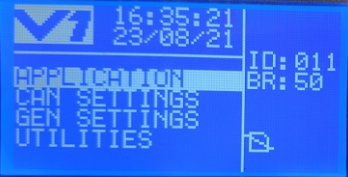
-
Go down to “CAN SETTINGS” and press “Enter”
-
Go down to “ACTIVE NODES” and press “Enter”
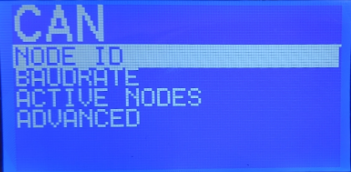
-
You should now see this screen
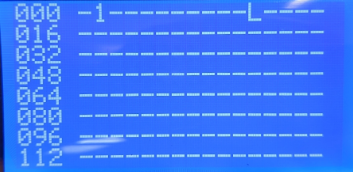
This is a table of all CANbus addresses, from 0 to 127
The device that you are currently using is displayed with the letter “L” (as in local). Any other device on the network is displayed with the number “1”
So in the example image above, the local device that I’m looking at is address 11 and one other device has been identified with address 1. -
Verify that you can see all the controllers that you expect to be there.
-
If you are unable to see all controllers, make sure that the CANbus network is terminated at each end (jumper between R and H, or R120 resistor between L and H). Also make sure that L and H are consistently connected at each controller.
-
Hello! It looks like you're interested in this conversation, but you don't have an account yet.
Getting fed up of having to scroll through the same posts each visit? When you register for an account, you'll always come back to exactly where you were before, and choose to be notified of new replies (either via email, or push notification). You'll also be able to save bookmarks and upvote posts to show your appreciation to other community members.
With your input, this post could be even better 💗
Registrera Logga in